

While browsing on Safari on iPhone or iPad some time some website want cookies. But generally iPhone doesn't allow cookies. But it can be turn on 😀 . Let's see hoe to turn Or allow cookies on iPhone while browsing using Safari.
PLEASE NOTE : Cookies is your browsing details and your location. It allow a website to get more about what you like,finding,looking for or what you are watching in details . But it is now harmful. Websites use cookies to give you the best result what you are looking for .
PLEASE NOTE : Cookies is your browsing details and your location. It allow a website to get more about what you like,finding,looking for or what you are watching in details . But it is now harmful. Websites use cookies to give you the best result what you are looking for .
Steps to enable cookies using Safari for iPhone or iPod
Step 1 : From your Home screen, go to Settings
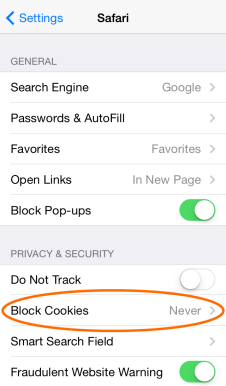
Step 2 : Then go to Safari
Step 3 : Then follow the bells steps For iOS 7 and iSO 6 Or lower versions -
For ISO 7 : Set Block Cookies to Never.
For iOS 6 and Lower versions: set Accept Cookies to Always.
Screenshots:




0 comments